Vai al contenuto
View in the app

A better way to browse. Learn more.

P300.it FORUM | Motorsport Media

A full-screen app on your home screen with push notifications, badges and more.

To install this app on iOS and iPadOS
  1. Tap the Share icon in Safari
  2. Scroll the menu and tap Add to Home Screen.
  3. Tap Add in the top-right corner.
To install this app on Android
  1. Tap the 3-dot menu (⋮) in the top-right corner of the browser.
  2. Tap Add to Home screen or Install app.
  3. Confirm by tapping Install.

Leaderboard

  1. 61066

    Bannati
    64
    Punti
    33867
    Numero messaggi
  2. Albi66

    Bannati
    39
    Punti
    9167
    Numero messaggi
  3. R18

    Staff
    15
    Punti
    42164
    Numero messaggi
  4. Bertoku

    Piloti professionisti
    10
    Punti
    2905
    Numero messaggi

Popular Content

Showing content with the highest reputation on 07/16/15 in all areas

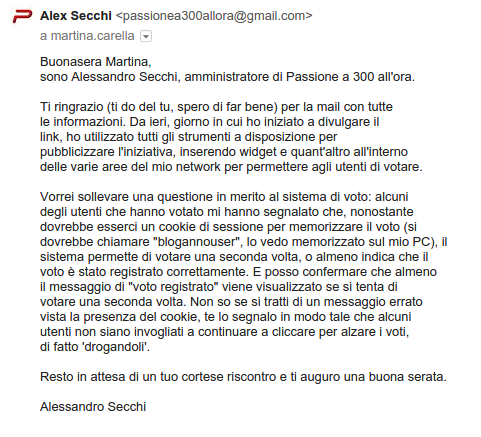
  1. "Buongiorno Alessandro, il sistema di voto consente all'utente di poter votare più volte, ma soltanto un voto al giorno - stabilito in base ad un algoritmo matematico - viene contabilizzato. Stiamo procedendo ad integrare le informazioni del regolamento per rendere più trasparenti le modalità di voto. Resto a disposizione per qualsiasi ulteriore dubbio o domanda. Grazie e buona giornata, Martina Carella." Benissimo, potete divertirvi quanto volete a questo punto.
  2. Probabilmente ti dà il messaggio ma poi conteggia solo x 1
  3. Non so se conteggiano solo un voto al giorno, ma basta aggiornare la pagina per votare di nuovo.
  4. Se dà la possibilità fatelo, a questo punto, ma non è comunque corretto.
This leaderboard is set to Roma/GMT+02:00

Configure browser push notifications

Chrome (Android)
  1. Tap the lock icon next to the address bar.
  2. Tap Permissions → Notifications.
  3. Adjust your preference.
Chrome (Desktop)
  1. Click the padlock icon in the address bar.
  2. Select Site settings.
  3. Find Notifications and adjust your preference.